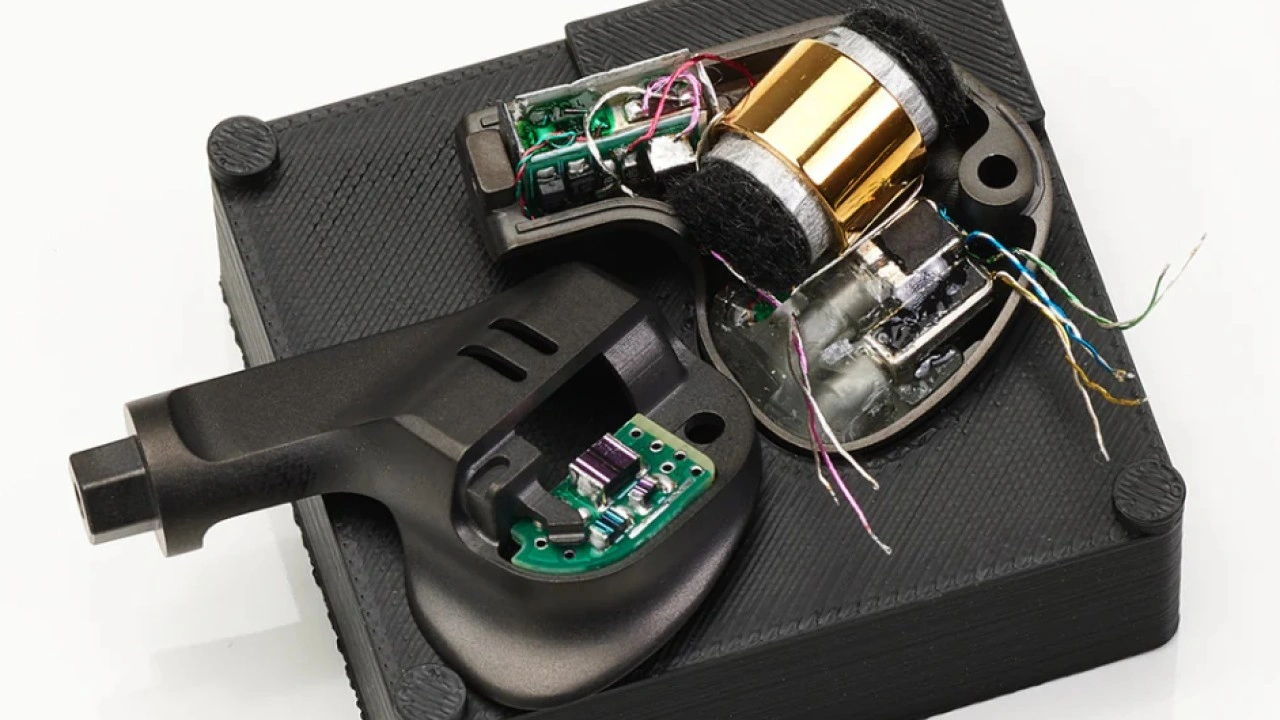
idk
10char
idk
10char
Yeah that’s a Fugaku which was confusing because the crossovers are in the box.
The new little brother is industry typical x/over network in the earbuds
those caps look beautiful, probably TOTL ones. Tantalums seems to be in pairs except for one tho, which is odd…
They are shoowing you what you are buying.
None of this trust us bro (I’m not your fucking brother)
What am I buying?
Basic stuff. Every driver, full exploded view.
I know some folks are watching..
Scumbag grifters.

They’ll probably try and convince their target audience that doing so will take away the ‘magic’ and give you ‘misconceptions’ about the product resulting in an ‘unwanted auditory hallucination’ 
how thick is fugaku shell?
They do look kind of swole right? Figure it’s the ear hooks creating that impression.
Your experiences and associated biases are not welcome.
Also,
tbh, your too fucking stupid to understand it
Also
We won’t try to teach you by sharing and explaining.
Basically,
Your experiences are not enough
We can’t be bothered holding your hand through this
Helping you learn nothing would…
take away our bonkers bullshit excuse for not telling you
Just give us your $5000 and go away

And probably: let us pad our profit margin by falling for it all…
To reiterate,
That wasn’t sarcasm.
2 people have said as much on here and 3 company owners to date have said the same thing
Your bias and lack of understanding is a problem.
It’s their problem
So just hide the info
(The problem is gone now)
Perpetuating the so called lack of understanding.
Just give us your money and trust some rando’s on Discord who are our friends

I know and remember reading those posts. This hobby still has a long way to go.
As an aside: I’ve been looking as NAS units to see what it would cost to set up a local network for streaming my digitised music to my DAPs. It is impossible to fathom having ASUS (to name one example) not spec the processor they use and instead saying something like ‘custom’ 
Curious, which brands have done this exactly?
Which models got busted?
For real? I am a bit out of the PC game but that wasn’t case before. Everything was pretty much transparent. Nowhere is stated which processor is? Btw there are couple of NAS options for home use, was looking also couple of years ago although they were quite expensive. There was cheaper solution with WD storage that had it’s own cloud network access through app and account but for that your DAP must have Android. Dunno how it goes recently with NAS for multimedia home use these days.
Exactly my point but I think the phrasing might have obfuscated that… As for brands, it depends on how you want to use them. If you’re looking to use Roon you’ll need a somewhat speedier one, Plex can do with less processing power as long as it is only music. I think I’ll go with SSD though, seeing those are faster and produce less noise / vibrations according to what I’ve read.
Oh, depending on how much storage you need, you can actually do this on a pretty affordable hardware by buying a used office pc (like HP elitedesk, lenovo thinkcentre and so on), i would look at the ones with an 8th gen intel at the oldest (and avoid amd if possible if you want to keep idle power drain lower).
If you want jellyfin (recommend over plex) and music with navidrome, an old 8th gen intel is more than enough.
The speed honestly doesnt matter even with jellyfin with bigger movie files on a hdd, your bottleneck is gonna be the ethernet lan speed either 1gbit or 2.5gbit anyway. However, if you do not want noise from the hdd, then yes ssd/nvme will be recommended as they are completely noiseless. But hdd is recommended for longevity.
Example this.
However this does not fit 3.5 inch hdds so if you want hdds then you should look at used but bigger pcs. Or you diy your own with cases from Jonsbo with like the N3 case.
As for ram which is expensive af, you be fine with 8gb if thats all you wanna run pretty much, 16gb would give you more headroom though.
As for OS, look at Unraid or just debian on it and then use docker managers like dockhand to then deploy jellyfin and navidrome via it.
@Rikudou_Goku know anything about this?
Never seen this, of the popular ones atm like synology (AVOID THIS BRAND!!), ugreen, terramaster and Qnap, they all do specify the cpu they use.
I was asking about iems, hiding drivers or crossovers and what not at overpriced kilobucks range
Thanks! Was hoping you’d chime in on this given how much you know about these things. I came across jellyfin as well but that (at first glance) seemed somewhat daunting to set up.
PS I’ll only be doing music so that should make for modest system requirements from what I’ve seen so far.
Of course there are many in the audio world doing the “custom” driver bs at all price ranges. You rarely see any pics of the internals as well and actual description of what is in it like crossovers, especially at the kilobuck+ range, the marketing is usually just some pretty words to make it sound more impressive than it is.