I would like to share my settings about how I drastically improved the sound of my KZ ZSN PRO headphones, and I would also like to know how other people feel about it.
I am an Audiophile and music producer, and after months of searching and testing I got this setting that for me, ALL sounds perfectly balanced, to the point where, if there is anything that sounds “unbalanced”, I can confidently guess that the issue is the mix or mastering of the audio source.
First: this headphones are very sensitive and so it has a problem of high “hiss” sound everytime it plays anything, for me it was annoying because it decreased the headroom of the audio signal (the noise can be higher that very quiet sounds, very bad for music producers), so the way I fixed this is buying an impedance adapter of around 80 ohms. I got mine from Aliexpress, and depending of the design they can get a little expensive.
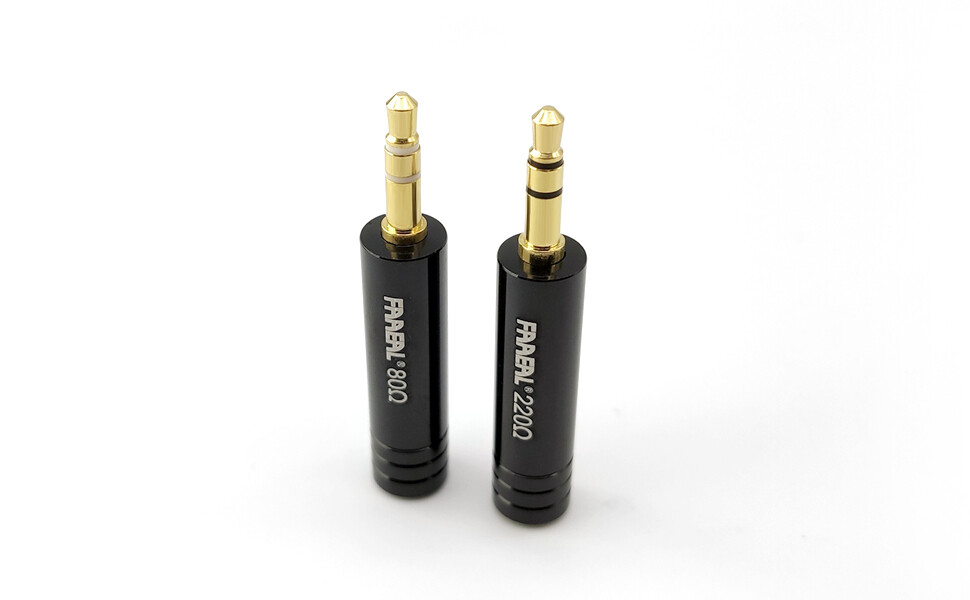
Once you plug in the adapter, the noise will get drastically decreased, but, it can get back if you have an AMP where you increase the volume too much. In my case I have an Audio Interface connected with USB and I just turn down the Volume Knob of the Headphone Output to the point where the noise completely disappears, so then you just adjust the volume with the digitally with the Computer volume.
In case you want to use a Smartphone, in my case the adapter works perfectly, no further adjustments because the noise is gone and I still have plenty of digital volume.
Now we get to the EQ configuration.
There is very well known site to EQ almost any headphones, AutoEQ, you can choose the headphone model and the Music Player or the Equalizer Program or App that you will use.
I selected EqualizerAPO for Windows since it allows for infinite number of filters and to EQ the whole sound of my PC, for both listening music and for producing music, so I chose that and download the settings file.
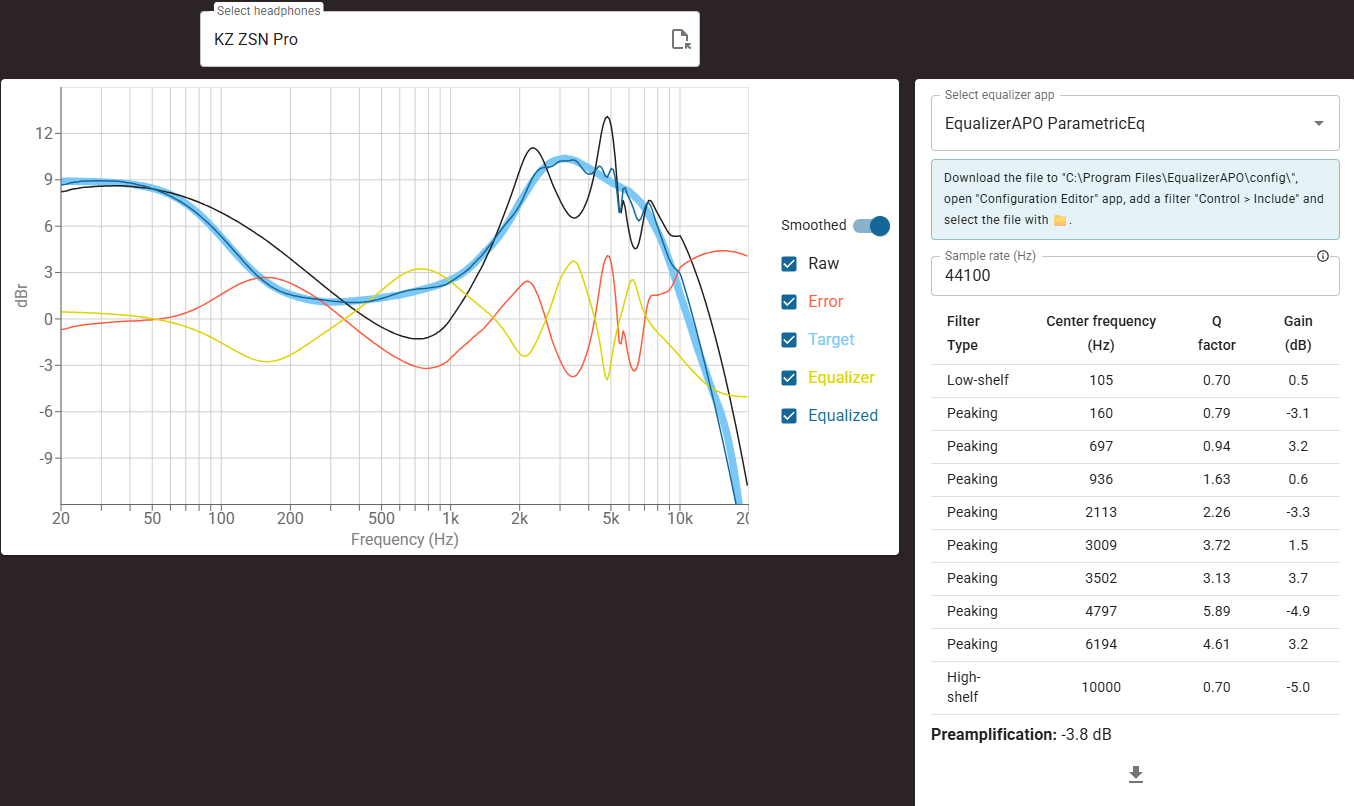
Once I loaded it, the sound was better, and apparently, match the Harman EQ curve. However, there were still problems with it, at least for my ears, many different frequencies were unbalanced for me, sometimes I felt that I wanted to increase the volume to perceive some frequencies but then other frequencies would sound incredibly loud and annoying, so I started adding more filters in top of the original curve.
After so much tests and listenings of my favorite music across different music genres and eras, I got this final curve:
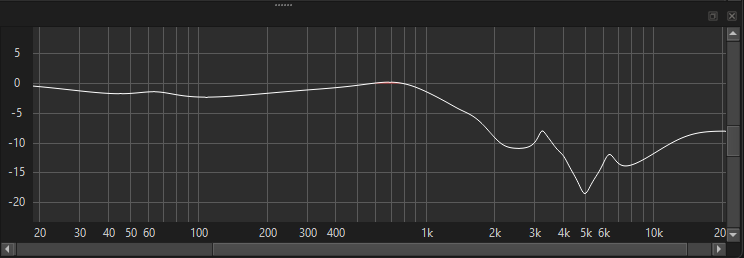
^ My own custom EQ
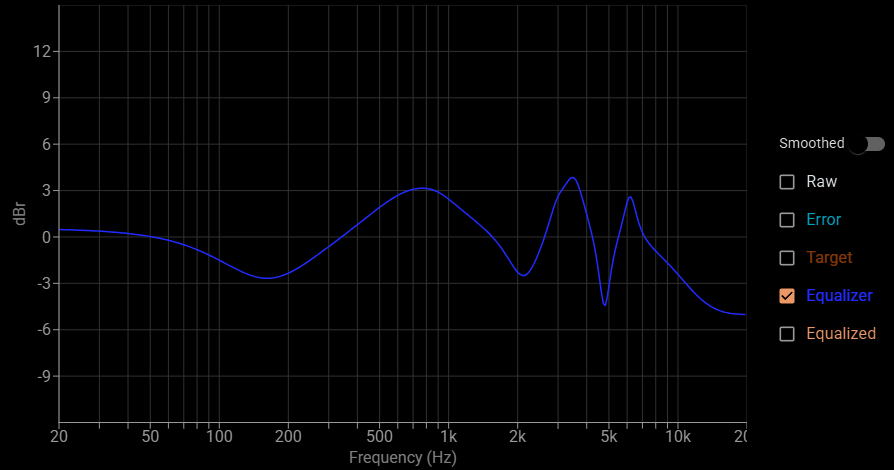
^ The Original AutoEQ curve (to comparison purposes)
Here is the file, copy and paste it on a Wordpad and save it as a .txt file, then open it with your EQ app, or manually add the filters if your EQ can’t import EQ files.
Preamp: -17 dB
Filter: ON LSC 5.9992 dB Fc 40 Hz Gain 6 dB
Filter: ON LS Fc 250 Hz Gain -1 dB
Filter: ON PK Fc 240 Hz Gain 2.5 dB Q 0.4
Filter: ON PK Fc 2000 Hz Gain 0 dB Q 0.9265
Filter: ON HSC Fc 3000 Hz Gain -2 dB Q 0.3333
Filter: ON PK Fc 3225 Hz Gain 2 dB Q 9
Filter: ON LSC Fc 3400 Hz Gain 13 dB Q 0.5901
Filter: ON HS Fc 7300 Hz Gain 11 dB
Filter: ON HS Fc 2300 Hz Gain -4 dB
Filter: ON HS Fc 11000 Hz Gain 4 dB
Filter: ON PK Fc 65 Hz Gain 1.4 dB Q 1.6
Filter: ON PK Fc 1670 Hz Gain 1 dB Q 2
Filter: ON LSC Fc 105 Hz Gain -0.5 dB Q 0.7
Filter: ON PK Fc 777 Hz Gain 3.7 dB Q 0.88
Filter: ON PK Fc 1407 Hz Gain -0.3 dB Q 3.36
Filter: ON PK Fc 2153 Hz Gain -2.5 dB Q 2.11
Filter: ON PK Fc 3425 Hz Gain 4.1 dB Q 3.02
Filter: ON PK Fc 4013 Hz Gain 1.3 dB Q 6
Filter: ON PK Fc 4973 Hz Gain -3.5 dB Q 5.82
Filter: ON PK Fc 6359 Hz Gain 4 dB Q 4.7
With this EQ I have arrived to a point where I don’t have to correct or calibrate anything anymore for any music genres. There will be of course outsiders were something is unbalanced, but in those cases you can be sure that something in their mixing or mastering is unbalanced and so you can make a custom EQ for specific music releases (or epochs/eras in the case of very old music where the bass sometimes sounds weaker).
I would like to have a sanity check too so I would appreciate to know how you feel this configuration. I am a person in his 3rd decade of life that ALWAYS wears headphones to protect my audition against live shows (or even in my own house is there is something very loud), and that also happens to enjoy music and be able to perceive every single band of frequency that an audio signal has 


